


It is because I saw people in youtube having their theme different (custom types), so I went to Google it. And I found a very intresting article (But its for Vista. But you can also do it in Windows 7 right?) here is the article (being shortened by me):
These are the ways to change your Windows XP (or others) to look like other OS...
Step 1:
First, make sure you have patched the uxtheme.dll file. If you haven't click here.
Step 2:
Now, lets go Google the theme you want. (For an example: Windows 7 themes for Windows XP)
If you really want the Windows 7 theme, please click here. ( asked you to take this is because this is the theme that I found to be most similar to the real Windows 7.)
Next, you go download it.
Step 3: Go unzip the file and place it at C:\WINDOWS\Resources\Themes (And for the Windows 7 download that I recremend u to download, just go to the file, to themes and click themes (which is an install...) It would help you install in automatically.. means no big probs!
Step 4: And remember to copy paste the Windows Visual Style File of the theme like the others are... (This step can be forgotten if you download the file I asked you to...)
Now, You are done with the theme only! (Which means the taskbar and some other stuffs) For me, its enough. But if you want it to look more like Windows 7, we will continue then!
For the Windows 7 theme link up there, there is a Windows 7 wallpaper there. And if you want another one, you can download it and browse it. And I think you know how to deal with it....
If you have Mozilla Firefox, you can edit the theme frm the dull grey colour of it to the one like Windows Vista (which is very similar to 7... ) You go to add-ons page (or click here) and type My FireFox and Vista-Aero and download it... Don't worry... Its less than 2 MB for them...
Mouse Cursors
Now, if you want the mouse cursors for Windows Vista (similar to 7) click here for the cursor pack. unzip it and here is how you install it:
Step 1:
Go to control panel and find Mouse
Step 2:
Select pointers
Step 3:
Select browse and find the cursor from the pack that suits and you are done!
Fine tuning
After that, fine tune your font settings and turn on ClearType fonts with the ClearType Tuner PowerToy (you can also do this online). Since the real Vista uses the font ‘Segoe UI’ which is a cleartype font, you can mimic the real fonts by using ClearType.
However, some themes already come with the Segoe UI font so don’t forget to enable it while you are using it.
Sidebar
Now... The intresting part... The Sidebar for Windows Vista (while you cannot do those paste gadgets like 7 in XP) This sidebar was told to use 50% less RAM than the normal Sidebar from Vista.. means not a lot of lags.... Just download it, unzip it and install it! Its that simple! Click here to download!
Aero Stuffs
I know people want Aero on their computer so it would look more like the real Vista/7. And I have found one thing that replaces the 3D flip of Vista. Its WinFlip! You just need to download, unzip and open it by pressing the exe... And you have it! The next time you want to use the WinFlip, Press Windows logo+Tab. to go to the next Window in WinFlip, just press Tab. To select the following window, press space/enter/left click.
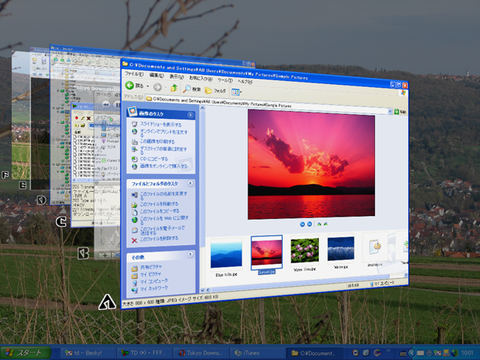
From WinFlip websiteAnother product is the Aero Peek. This product does the same as it in Windows 7. I am not going to try it as I don't want to download the Microsoft .NET Framework 3.5. To download it (The product, click here.

I found another Aero stuff that is found in Windows 7. The Aero Snap. It snaps to the side when you drag it to the side and full screen if you drag it to the top. Click here to download it. And here is the demo of the Aero snap and a pic.

Here are some Aero gadgets that are useful to me.. But you can find most of the apps easily by typing app name + for (Your OS type) (For an example Aero Shake for XP)
Notes
And now, you could be said done with it! you can be deemed using the "limited edition" of Windows 7. And if you don't investigated the stuffs in the Windows 7 theme download files, you will say why the taskbar below have words on it while it dosn't have in Windows 7... You need to go back to the downloaded file and click on "Iconize Taskbar Hack" and click install.... Restart and its there... Logo only... But if you want to go back to normal, to back the the "Iconize Taskbar Hack" folder and click uninstall and restart...
Now, Hope you would have fun on those edits and show off your friends about this!
Now, here are some pictures that I took....


